Track Layout
A consistent track layout is the single most useful organizational habit in documentary conform. When every project lands with the same structure, the finisher can work faster, make fewer mistakes, and spot problems quickly.
This layout is a preference, not a hard requirement. Simpler projects often use fewer tracks, and complex projects may need more. The important thing is to communicate your track structure before delivering the first turnover.
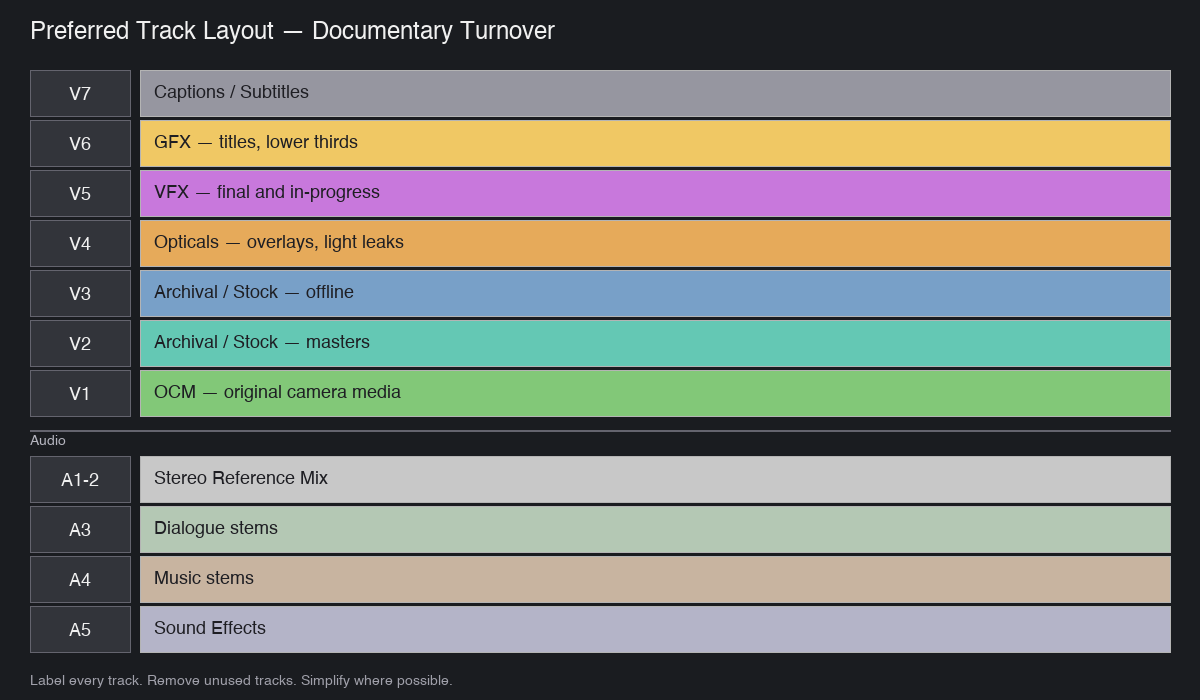
Preferred Video Track Layout
| Track | Contents | Notes |
|---|---|---|
| V1 | Original Camera Media (OCM) | On-camera interviews, vérité footage, B-roll. Add more video tracks below V1 only if layering or compositing is needed |
| V2 | Archival + Stock Masters | High-quality, final, approved archival and stock. Fair-use material goes here too |
| V3 | Archival + Stock Offline | Lower-quality or placeholder archival. Makes it easy to spot what still needs licensing |
| V4 | Opticals | Overlays, light leaks, film burns, additional look elements |
| V5 | VFX | Finalized or in-progress VFX shots. Include a reference layer if working with WIP — see WIP convention |
| V6 | GFX | Titles, lower thirds, graphics, logos. NLE-built titles must also be marked on the timeline with a unique marker color |
| V7 | Captions / Subtitles | Only if part of picture delivery |
Preferred Audio Track Layout
Important: Deliver audio as embedded or sidecar mono/stereo files, not as raw multi-track audio inside the AAF. Raw audio in AAF significantly increases file size and can cause import issues in Resolve.
| Track | Contents | Purpose |
|---|---|---|
| A1–A2 | Stereo Reference Mix | A reference mix for picture conform and reference QuickTime only. Not a replacement for stem delivery to post sound |
| A3 | Dialogue | Cleaned dialogue stems |
| A4 | Music | Music stems |
| A5 | Sound Effects | SFX stems, ambience, Foley |
Visual Overview
┌─────────────────────────────────────────────────────────────┐
│  V7  │  Captions / Subtitles                                │
├──────┼──────────────────────────────────────────────────────┤
│  V6  │  GFX — titles, lower thirds, graphics                │
├──────┼──────────────────────────────────────────────────────┤
│  V5  │  VFX — final and in-progress                         │
├──────┼──────────────────────────────────────────────────────┤
│  V4  │  Opticals — overlays, light leaks                    │
├──────┼──────────────────────────────────────────────────────┤
│  V3  │  Archival / Stock — offline or placeholder           │
├──────┼──────────────────────────────────────────────────────┤
│  V2  │  Archival / Stock — final masters                    │
├──────┼──────────────────────────────────────────────────────┤
│  V1  │  OCM — original camera media                         │
╞══════╪══════════════════════════════════════════════════════╡
│ A1-2 │  Stereo Reference Mix                                │
├──────┼──────────────────────────────────────────────────────┤
│  A3  │  Dialogue                                            │
├──────┼──────────────────────────────────────────────────────┤
│  A4  │  Music                                               │
├──────┼──────────────────────────────────────────────────────┤
│  A5  │  Sound Effects                                       │
└─────────────────────────────────────────────────────────────┘
Principles
Simplify Where Possible
Fewer tracks means a cleaner conform. Do not split material across tracks just to show off organization — use tracks where they add clarity, not complexity.
Label Every Track
Every video and audio track should be named in the NLE before export. Generic labels like V1, V2, A3 travel into Resolve as-is; named tracks (V1 OCM, V2 Archival Masters) make the conform far easier to read.
Remove Unused Tracks
Delete any track that contains no clips in the final sequence. Empty tracks clutter the conform and can confuse automated tools.
Consistent Labeling Across Projects
If you work on multiple shows, keep the labeling pattern identical across them. Consistency compounds — one editor, three shows, same track layout saves hours over a season.
Variations by Project Type
Not every project needs the full seven-video-track layout. Common variations:
| Project Type | Typical Layout |
|---|---|
| Short-form social | V1 OCM, V2 GFX, A1-2 Stereo Mix |
| Corporate / branded content | V1 OCM, V2 B-roll, V3 GFX, A1-2 Stereo, A3 Dialogue, A4 Music |
| Standard documentary | The full layout above |
| Series episodic | Full layout, plus dedicated tracks for recurring titles and promo elements |
| Feature documentary | Full layout, expanded VFX tracks, dedicated track for temp music vs licensed |
When in doubt, ask. Ten minutes of alignment up front eliminates rework later.
Pre-Export Track Checklist
- Every video and audio track named in the NLE (no anonymous
V1,A3) - Empty / unused tracks removed from the sequence
- V3 archival placeholders flagged with a marker so they’re easy to spot
- V5 WIP VFX have a reference layer alongside if needed
- V6 NLE-built titles marked with a unique marker color
- Stem audio (A3 dialogue, A4 music, A5 SFX) on the right tracks per the layout
- Layout matches what was communicated to the conformer in the turnover email